Upfirm: A Versatile Presentation Template for Startups
Creating a compelling narrative is often the most challenging aspect of launching a new venture or showcasing a creative portfolio. The visual vessel that carries your message matters just as much as the data itself. Upfirm serves as a comprehensive presentation template designed to bridge the gap between raw information and persuasive storytelling. Rather than offering a rigid structure, this template provides a flexible framework that adapts to the specific needs of entrepreneurs, agencies, and individual creators. It addresses the common pain point of spending hours on design rather than strategy, allowing users to focus on refining their pitch while maintaining a professional, pixel-perfect aesthetic.
Beyond the Pitch Deck: Diverse Applications
While Upfirm is frequently associated with startup pitch decks, its utility extends far beyond fundraising. The architecture of the template supports a wide variety of professional contexts because it prioritizes clarity and modularity over niche-specific gimmicks. Understanding how to leverage this versatility is key to maximizing its value.
For Creative Agencies and Design Studios, the template functions as a dynamic company profile. Instead of static text blocks, you can utilize the handcrafted infographic slides to visualize your service workflow or case study results. This transforms a standard capabilities deck into an engaging visual experience that demonstrates your agency's design sensibility before you even speak. The clean lines and modern typography signal professionalism, while the editable graphics allow you to inject your unique brand identity without breaking the layout.
Freelancers and Personal Portfolios face the unique challenge of marketing themselves as both the product and the service provider. Upfirm offers dedicated layouts for personal branding that avoid the corporate stiffness of traditional business templates. You can adapt the team introduction slides to highlight your individual skills, certifications, and project history. For photographers or visual artists, the picture placeholders are designed to respect aspect ratios and negative space, ensuring that your work remains the focal point rather than being crowded by decorative elements.
In Corporate and Business Settings, consistency is paramount. Internal reports, quarterly reviews, and training materials often suffer from disjointed formatting when multiple stakeholders contribute. Because Upfirm is based on Master Slides, global changes to fonts, colors, or logos propagate instantly across all 35 slides. This feature ensures that internal communications maintain the same level of polish as external-facing investor decks, reinforcing brand cohesion across every touchpoint.
Strategic Customization Through Master Slides
The true power of any high-quality presentation template lies in its underlying technical structure. Upfirm is built upon a robust Master Slide system, which distinguishes it from basic theme packs where every slide must be formatted individually. This approach respects the user's time and encourages better design hygiene.
When you modify a Master Slide, you are essentially editing the blueprint of the presentation. If your brand guidelines require a specific footer placement or a distinct header style, adjusting the master ensures uniformity across the entire deck. This is particularly useful when collaborating with teams. A marketing manager can set up the visual parameters once, and team members can add content later without accidentally misaligning elements or using incorrect typefaces. This reduces the friction of collaboration and minimizes the need for tedious quality assurance checks before a meeting.
Furthermore, the "easy customizable contents" promise is realized through smart object grouping. Elements are logically organized in layers, making it intuitive to swap out icons, adjust chart data, or resize images. This technical accessibility lowers the barrier to entry for non-designers, empowering subject matter experts to create visually competent presentations without constant reliance on a graphic designer.
Leveraging Visual Data and Infographics
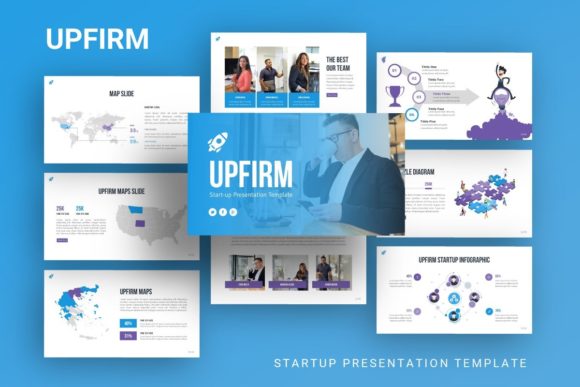
Data visualization is often where presentations fail. Complex datasets can overwhelm an audience if not translated into digestible visuals. Upfirm includes handcrafted infographics specifically designed for PowerPoint, moving away from generic clip art toward bespoke illustrations that communicate authority.
These infographics are fully vector-based and resizable. This means you can scale them for a massive conference screen or a detailed PDF report without losing crispness. More importantly, they are editable. You are not locked into the demo’s color palette or iconography. A fintech startup might use the process diagrams to explain blockchain transactions, while an educator could repurpose the exact same slide structure to illustrate a historical timeline. The semantic flexibility of these graphics allows them to serve multiple narrative purposes depending on the context.
When using these assets, prioritize relevance over decoration. Select infographic styles that match the cognitive load of your content. Use simple comparison charts for binary choices and detailed flowcharts only when explaining systemic relationships. The goal is to enhance comprehension, not to fill empty space. Upfirm provides the tools, but effective communication requires intentional selection.
Practical Workflow and Asset Management
Adopting a new template should streamline your workflow, not complicate it. Upfirm comes with a documentation file and vector icon set that facilitate a smooth start. Before diving into content creation, take fifteen minutes to review the documentation. Understanding the intended use of specific slide masters will prevent frustration later. Familiarize yourself with the included vector icons; having a cohesive icon library at your disposal eliminates the visual dissonance that occurs when mixing icon styles from different sources.
It is crucial to manage expectations regarding imagery. As noted in the product details, all images in the demo are for preview purposes only and are not included in the files. This is actually a benefit for serious users. It forces you to source or create original photography that aligns with your specific message rather than relying on overused stock photos that dilute your brand’s authenticity. Treat the picture placeholders as structural guides for composition. When you drag and drop your own high-resolution assets into these frames, the result feels bespoke and intentional.
Maintaining Clarity and Audience Focus
Having access to 35 unique slides does not mean you should use all of them. One of the most practical ways to use Upfirm effectively is through subtraction. Audit your content against your audience’s needs. Does this slide advance the narrative? Is this infographic clarifying a complex point or merely adding visual noise?
For a Pitch Deck, brevity is currency. Investors scan decks quickly. Utilize the bold headline slides and concise data summaries found in Upfirm to make key metrics stand out. Avoid dense paragraphs. Use the template’s hierarchy to guide the viewer’s eye to the most critical information first.
For a Portfolio, let the work breathe. Use the minimalist layout options to frame your projects. Resist the urge to clutter slides with excessive biographical text. Your past work is the primary evidence of your capability; the template should act as a gallery wall, not a billboard.
Consistency builds trust. Whether you are presenting to potential clients, investors, or students, a cohesive visual language suggests organizational competence. By sticking to the predefined color schemes and typographic pairings within Upfirm, you ensure that your presentation feels like a unified whole. If you must deviate to accommodate specific brand requirements, do so systematically via the Master Slides to preserve structural integrity.
Final Thoughts on Implementation
Upfirm represents a balance between creative freedom and structural discipline. It provides the scaffolding necessary for professional presentations while leaving ample room for individual expression. Success with this template comes from understanding its features not just as design elements, but as communication tools. By leveraging the Master Slide system for efficiency, utilizing handcrafted infographics for clarity, and adapting the versatile layouts to your specific industry context, you transform a standard .PPTX file into a strategic asset. Remember that the template is the starting line, not the finish line. Your insights, curated content, and authentic voice are what ultimately make the presentation resonate with your audience.