Presentation Template - Glamly: A Versatile Design Tool
Visual communication is rarely one-size-fits-all. What works for a startup pitch deck often falls flat in an academic lecture, just as a corporate quarterly report requires a different tone than a personal photography portfolio. The Presentation Template - Glamly addresses this variance by offering a flexible foundation rather than a rigid structure. At its core, this resource provides 36 distinct slides designed to accommodate diverse narratives, from creative agency showcases to business proposals. However, its true value lies not just in the slide count, but in how different users can adapt these assets to meet specific professional and personal objectives without starting from scratch.
Diverse Applications Across Professional Roles
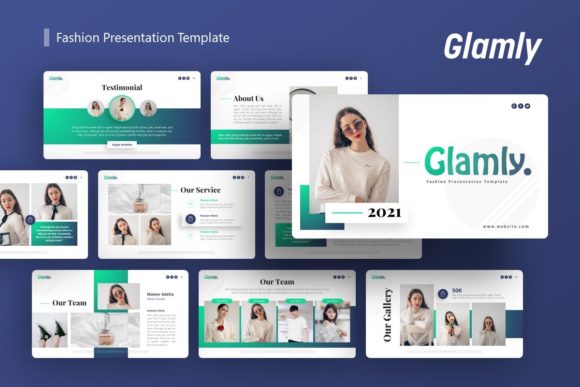
The utility of a template like Glamly shifts significantly depending on who is using it and what they aim to achieve. For a creative agency or freelancer, the primary concern is often aesthetic cohesion and visual impact. These users typically evaluate the template based on its "handcrafted infographic" elements and pixel-perfect illustrations. They need assets that signal high-quality design work before they even present their actual portfolio pieces. For this group, the drag-and-drop picture placeholders are essential time-savers, allowing them to swap in client work or personal projects rapidly while maintaining a polished, consistent look across all 36 slides.
Conversely, corporate professionals and business owners prioritize clarity, data visualization, and brand alignment over pure artistic flair. When introducing Glamly fashion presentations or corporate profiles, these users focus heavily on the Master Slide functionality. This feature ensures that global changes—such as updating a logo, adjusting color palettes to match brand guidelines, or changing fonts—apply instantly across the entire deck. For a marketing manager preparing a pitch deck, this reliability reduces the risk of formatting errors and ensures that the presentation remains professional and on-brand, regardless of how many times the content is revised.
Educators and students approach presentation templates with a different set of priorities: learning value and accessibility. Beginners may feel intimidated by blank slides, so the pre-designed layouts serve as a structural guide for storytelling. Rather than worrying about where to place text or how to align images, they can focus on refining their message. The included documentation file becomes particularly valuable here, acting as a tutorial that helps less experienced PowerPoint users understand how to manipulate vector icons and edit graphics effectively. For this audience, the template is both a productivity tool and an educational scaffold.
Evaluating Technical Flexibility and Ease of Use
Beyond specific job titles, potential users must weigh technical features against their own skill levels and project requirements. One of the most critical aspects of the Presentation Template - Glamly is that all graphics are resizable and editable. This distinction matters immensely when comparing it to templates that rely on flattened images or locked layers.
- For Experienced Designers: Editable vectors mean the template is a starting point, not a final destination. You can deconstruct infographics, recolor individual elements, and repurpose shapes to create entirely new visuals that still harmonize with the original theme.
- For Non-Designers: Resizable graphics ensure that content doesn't break when you add more text or change aspect ratios. It provides a safety net that maintains visual integrity even if you lack advanced design skills.
- For Speed-Oriented Users: The combination of master slides and drag-and-drop placeholders significantly reduces production time. If you have a meeting in two hours, you can assemble a coherent deck without wrestling with alignment tools.
The inclusion of a .PPTX file format also speaks to practical compatibility. While some modern tools offer proprietary formats, sticking to PowerPoint ensures that the file can be opened, edited, and presented on almost any standard office computer. This reliability is crucial for professionals who may need to present on unfamiliar hardware or share files with clients who use legacy software.
Aligning Features with Specific Project Goals
Determining whether this template matches your needs requires honest assessment of your project type. If you are building a personal portfolio, the variety of 36 slides allows you to showcase different types of work—case studies, testimonials, image galleries, and contact information—without the presentation feeling repetitive. The fashion-forward aesthetic implied by the name "Glamly" lends itself well to lifestyle, beauty, and apparel industries, but the clean layout principles make it adaptable for tech startups or consulting firms as well.
However, if your goal is highly technical or academic research involving complex datasets, you should evaluate whether the handcrafted infographics can be sufficiently modified to represent your specific data accurately. While the vector icons and editable graphics offer flexibility, forcing generic fashion-oriented visuals into a scientific context can sometimes create cognitive dissonance for the audience. In such cases, the template works best when you strip back the decorative elements and utilize the underlying grid systems and typography hierarchies.
For entrepreneurs creating pitch decks, the balance between style and substance is paramount. Investors appreciate professionalism, but they also respond to clear visual hierarchy. The template’s structure supports this by providing dedicated layouts for problem statements, market analysis, and financial projections. The key is to leverage the template's polish to enhance credibility while ensuring the customizable contents remain authentic to your unique business proposition.
Understanding Limitations and Best Practices
To get the most out of the Presentation Template - Glamly, users must understand what is and isn't included. A common point of confusion for first-time buyers is the preview imagery. It is important to note that all images shown in the demo are for preview purposes only and are not included in the downloadable files. This is standard industry practice, but it means you must have your own high-quality photography or stock assets ready to go. Relying solely on the template without preparing complementary visual assets can result in a disjointed final product.
Additionally, while the template is easy to customize, achieving a truly professional result still requires attention to detail. Simply dragging and dropping content without considering whitespace, contrast, and narrative flow will yield mediocre results. Users should treat the Master Slides as a design system. By setting up your colors, fonts, and logo placement in the master view first, you ensure consistency that manual editing cannot match. This upfront investment of time pays dividends during the actual content creation phase.
Ultimately, the decision to use this template should be driven by efficiency and quality standards. If you find yourself spending hours aligning text boxes or searching for matching icons, the Presentation Template - Glamly offers a structured solution. Whether you are a hobbyist documenting a passion project or a CEO outlining next year's strategy, the template provides a versatile canvas. Its strength lies in its ability to serve as a professional shortcut for experts and a confidence builder for beginners, bridging the gap between raw content and compelling visual storytelling.