Board Presentation Template: Design for Impact
Creating a compelling narrative is often the difference between securing funding and walking away empty-handed. The Board Presentation Template serves as more than just a collection of slides; it is a strategic framework designed to organize complex information into a digestible, persuasive story. For entrepreneurs, agency owners, and creative professionals, this template bridges the gap between raw data and visual storytelling. It provides a structured environment where business logic meets aesthetic precision, allowing you to focus on refining your message rather than wrestling with alignment tools or font pairings.
The true value of this resource lies in its versatility. While optimized for startup pitch decks and corporate profiles, the underlying design system supports a wide array of communication needs. Whether you are a photographer showcasing a portfolio, a marketer presenting quarterly analytics, or an educator explaining a new curriculum, the Board template adapts to your specific context. It removes the friction of starting from scratch, offering a professional foundation that respects both your content and your audience’s time.
Strategic Applications Across Industries
One of the most significant advantages of the Board Presentation Template is its sector-agnostic design language. It avoids overly niche styling that limits reuse, instead opting for clean lines and balanced whitespace that elevate any subject matter. This flexibility allows different professionals to leverage the same core asset for vastly different outcomes.
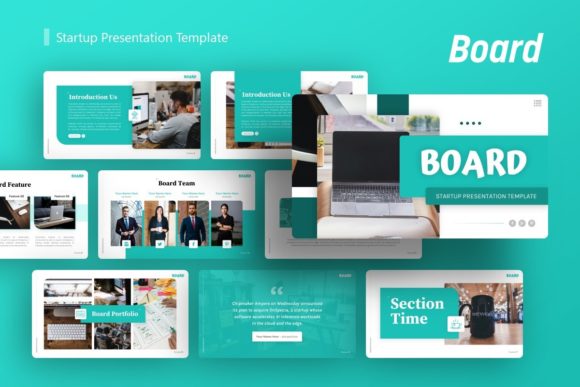
For Startups and Pitch Decks: Investors review hundreds of decks annually. Standing out requires clarity, not chaos. This template includes dedicated layouts for problem-solution narratives, market sizing, and financial projections. The handcrafted infographics transform dense statistics into visual evidence of growth potential. By using pre-designed master slides for team introductions and roadmaps, founders can ensure their deck looks institutional-grade, signaling maturity and attention to detail.
For Creative Agencies and Portfolios: Visual professionals need a backdrop that enhances their work without competing with it. The picture placeholders in this template are engineered for high-impact imagery. Photographers and designers can utilize the grid-based layouts to create rhythm across the presentation, guiding the viewer’s eye through case studies or artistic collections. The minimalist aesthetic ensures that your creative output remains the protagonist of the story.
For Corporate and Business Reporting: Internal communications often suffer from visual fatigue. Using this template for company profiles or quarterly updates introduces a fresh, modern standard to corporate reporting. The resizable graphics allow department heads to customize data visualization while maintaining brand consistency across the organization. It turns routine updates into engaging briefings that stakeholders actually want to read.
Maximizing the 36-Slide Ecosystem
A common mistake when using comprehensive templates is treating every slide as mandatory. The Board Presentation Template offers 36 distinct slides, but effective communication often requires subtraction. Approach this library as a modular toolkit rather than a linear script. Your goal is to select the specific layouts that support your unique narrative arc.
Consider the flow of information before opening PowerPoint. Map out your key messages first, then browse the template for slides that visually reinforce those points. If you are explaining a complex process, utilize the step-by-step infographic slides. If you are building emotional connection, prioritize full-bleed image layouts with minimal text overlays. The variety included in this pack allows you to control pacing, alternating between data-heavy analysis and visual breathing room to keep your audience engaged.
Do not feel constrained by the original demo content. The "drag and drop" functionality is designed for rapid iteration. Swap out placeholder images with your own assets immediately to see how the layout truly functions with your material. Often, a slide that looks generic in preview becomes powerful once populated with relevant, high-quality photography or proprietary charts. This immediate feedback loop helps you curate the most effective version of your presentation.
Customization Without Compromising Quality
The fear of breaking a professional design often prevents users from fully customizing templates. Board is built on Master Slides specifically to mitigate this risk. This technical foundation ensures that global changes—such as updating a logo, changing a color palette, or adjusting body typography—propagate consistently across all selected slides. You maintain pixel-perfect alignment even when making significant branding adjustments.
When adapting the color scheme, consider accessibility and readability alongside aesthetics. The template’s vector icons and illustrations are fully editable, meaning you can adjust stroke weights and fills to match your brand guidelines precisely. However, exercise restraint. A cohesive presentation typically uses two primary colors and one accent color. Over-customizing every element can lead to visual noise that distracts from your core message. Use the template’s existing hierarchy as a guide; if a slide feels cluttered after customization, revert to the cleaner default state and add elements back only if they serve a functional purpose.
Typography plays a crucial role in tone. While the template comes with recommended fonts, swapping them for your corporate typeface is straightforward via the Master Slide view. Ensure you test your chosen fonts at various sizes. What works on a laptop screen may become illegible when projected in a conference room. The resizable nature of all graphic elements means you can safely scale text boxes and shapes to accommodate longer headlines or denser paragraphs without destroying the layout’s integrity.
Practical Workflow Recommendations
To get the most out of the Board Presentation Template, adopt a workflow that prioritizes content strategy over decoration. Start by reviewing the included documentation file. Understanding the layer structure and master slide relationships upfront saves hours of troubleshooting later. Familiarize yourself with which elements are locked and which are free-floating to avoid accidental misalignments during high-pressure editing sessions.
Remember that the images shown in the preview are for demonstration purposes only and are not included in the download. This is actually a benefit, as it forces you to source authentic visuals that resonate with your specific audience. Avoid generic stock photography that mimics the demo too closely. Instead, use the placeholders as guides for composition. If a layout calls for a portrait-oriented image, crop your landscape photos intentionally or source vertical assets that fit the frame naturally. Forced cropping often degrades image quality and professionalism.
Finally, treat the handcrafted infographics as starting points for your own data. These vector-based assets are superior to static screenshots because they remain crisp at any zoom level. Edit the data labels and values directly within PowerPoint to ensure accuracy. If your dataset differs significantly from the example, use the editable shapes to restructure the chart rather than forcing your numbers into an incompatible format. Authenticity in data presentation builds trust, and having fully editable vectors ensures your visuals always reflect reality.
Elevating Your Visual Communication Standard
Investing time in mastering a robust tool like the Board Presentation Template yields compounding returns. Each project becomes faster to produce and higher in quality. You develop a reusable visual vocabulary that strengthens your personal or corporate brand identity over time. More importantly, you free up mental energy to focus on what truly matters: crafting a narrative that moves people to action.
Whether you are pitching to venture capitalists, onboarding new clients, or documenting a creative journey, the standard of your visual delivery sets expectations for the quality of your work. This template provides the polish and structure necessary to meet those expectations consistently. By combining practical utility with thoughtful design, it empowers creators and business leaders to communicate with confidence, clarity, and purpose. Use it not just to fill slides, but to sharpen your thinking and amplify your impact.