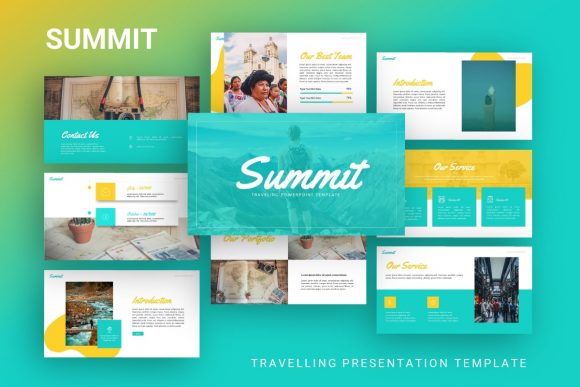
Presentation Template - Summit: Elevating Your Visual Storytelling
When you are preparing for a high-stakes meeting or a creative showcase, the last thing you want to worry about is aligning text boxes or searching for matching icons. Presentation Template - Summit addresses this friction point directly by offering a comprehensive visual framework designed for versatility. Rather than forcing your content into a rigid structure, Summit provides a flexible foundation that adapts to narrative needs, whether you are pitching a tech startup, displaying a photography portfolio, or outlining a corporate quarterly review. The template serves as a professional shortcut, allowing you to bypass the tedious setup phase and focus entirely on refining your message and connecting with your audience.
Real-World Applications Across Industries
The true value of Summit lies in its chameleon-like ability to fit distinct professional contexts without looking generic. While many templates claim versatility, Summit’s design language strikes a balance between corporate professionalism and creative flair, making it genuinely useful across different sectors.
Creative Agencies and Portfolios
For designers, photographers, and creative directors, the aesthetic of the presentation is often judged as heavily as the work itself. Summit includes specific layouts optimized for visual-heavy content. The picture placeholders are designed with drag-and-drop functionality that respects aspect ratios, ensuring your photography or design mockups remain crisp and undistorted. In a client pitch scenario, an agency can utilize the handcrafted infographics to break down complex creative processes or campaign results into digestible visuals. This transforms abstract creative concepts into tangible business value for clients who may not speak "design" fluently.
Startups and Pitch Decks
Founders often struggle to translate their vision into a slide deck that investors trust. Summit offers structured flows ideal for pitch decks, including slides dedicated to problem-solution dynamics, market size visualization, and team introductions. Because the template is based on Master Slides, changing the primary color scheme to match your startup’s branding takes seconds rather than hours. This consistency signals attention to detail—a trait investors actively look for. The resizable vector graphics allow you to create custom diagrams explaining your unique technology or service model without needing to hire an illustrator for every iteration of the deck.
Corporate Profiles and Business Reporting
In more traditional business environments, clarity reigns supreme. Summit’s 35-slide variety ensures that data-heavy presentations do not become monotonous. You can alternate between full-image impact slides and clean, grid-based data layouts to maintain audience engagement during long reports. The included documentation file acts as a style guide, helping teams maintain brand consistency even when multiple people are contributing to a single presentation. For internal training or company profiles, the pixel-perfect illustrations add a layer of polish that standard office themes lack, elevating routine communications to feel more intentional and valued.
Navigating Customization and Workflow
Understanding how to leverage the technical features of Presentation Template - Summit is key to maximizing efficiency. The template is built on PowerPoint .PPTX architecture, which remains the industry standard for compatibility. However, the "easy customizable contents" promise relies on users understanding the difference between editing individual slides and utilizing the Master Slide system.
Experienced users will appreciate that global changes propagate instantly. If you need to update a logo placement or adjust header fonts across all 35 slides, doing so via the Master Slide view prevents formatting errors later. For those less familiar with PowerPoint’s backend, the included documentation provides necessary guidance. It is worth noting that while the template is editable, maintaining the integrity of the handcrafted infographics requires some care. These elements are grouped vector shapes; ungrouping them allows for deep customization but can sometimes break alignment if you aren't comfortable manipulating anchor points. Keeping elements grouped and using the resize handles is usually the safer route for quick edits.
Strategic Considerations Before Implementation
Before downloading or deploying Summit, there are practical factors to weigh to ensure it aligns with your current project needs. One critical consideration is asset management. As noted in the product details, all images in the demo are for preview purposes only and are not included in the files. This means you must have your own high-quality imagery ready before you begin building. Using low-resolution stock photos or placeholder clip art will undermine the premium feel of the template. Budget time for sourcing or creating assets that match the sophisticated tone of the layout.
Another consideration is the scope of your content versus the available slide count. With 35 unique slides, Summit offers significant variety, but it is not infinite. Users with massive datasets or highly niche technical requirements might find they need to duplicate and modify existing layouts rather than finding a perfect pre-made match for every single point. This is where the "all graphic resizable and editable" feature becomes essential. View the template as a robust starting kit rather than a finished product; expect to spend some time tailoring the generic infographic structures to your specific metrics.
Balancing Strengths and Limitations
No template is a universal solution, and recognizing where Summit excels versus where it might fall short helps manage expectations. Its primary strength is undoubtedly the quality of its native PowerPoint construction. Unlike templates that rely on heavy external plugins or non-standard fonts that cause display issues on other computers, Summit’s use of standard vector icons and master slide logic ensures portability. You can confidently email this file to a colleague or present on a venue computer without fearing broken layouts.
However, the very polish that makes Summit attractive can be a limitation for brands with extremely avant-garde or brutalist identity guidelines. The design leans toward modern minimalism and clean corporate aesthetics. If your brand voice is chaotic, grunge-inspired, or intentionally anti-design, the smooth lines and balanced grids of Summit might require such heavy modification that starting from scratch would be faster. Additionally, while the infographics are handcrafted, they are static vectors. They do not link to live Excel data automatically. If your presentation requires real-time data updating, you will need to manually refresh these visuals or overlay native PowerPoint charts, which may alter the intended aesthetic.
Maximizing Impact Through Preparation
To get the most out of Presentation Template - Summit, approach your workflow strategically. Start by auditing your content against the available slide layouts. Map out your narrative arc first, then select the Summit slides that support that story, rather than picking slides because they look nice and trying to force content into them. Utilize the vector icon set to create visual anchors for recurring themes throughout the deck; this creates subconscious cohesion for the viewer.
Remember that the template handles the heavy lifting of alignment, spacing, and typography hierarchy. Your role shifts from designer to curator. Focus on writing concise copy that complements the spacious layouts rather than fighting against white space. When used correctly, Summit doesn't just make your slides look better; it forces a discipline of clarity and brevity that improves the actual communication effectiveness of your presentation. Whether you are a solo freelancer building a personal portfolio or a marketing director launching a new product line, treating this template as a strategic communication tool rather than mere decoration will yield the best return on your creative investment.