Learn Crafty: A Versatile Google Slides Template
Creating a visually compelling presentation often feels like a balancing act between design aesthetics and content clarity. For professionals, educators, and creatives who need to communicate ideas effectively without spending hours on graphic design, the Google Slides Template - Learn Crafty offers a practical solution. This template is designed to bridge the gap between professional polish and user-friendly customization, serving as a comprehensive toolkit for various presentation needs. Whether you are launching a startup, showcasing a photography portfolio, or delivering an educational lecture, this resource provides the structural foundation necessary to engage your audience from the first slide to the last.
Understanding the Core Value and Design Philosophy
At its heart, Learn Crafty is more than just a collection of pretty slides; it is a system built on Master Slides. This technical distinction matters significantly for users who may not be design experts. When elements are anchored to master slides, global changes—such as updating a logo, changing a color palette, or adjusting font hierarchy—can be applied across multiple layouts instantly. This ensures consistency throughout your deck, which is crucial for maintaining brand identity in corporate profiles or pitch decks.
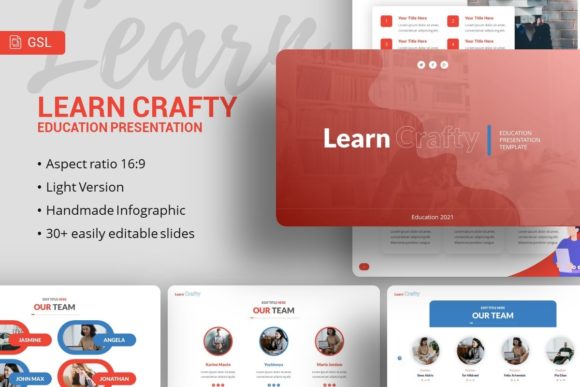
The template includes 35 unique slides, providing enough variety to prevent visual fatigue while remaining manageable. Unlike generic templates that offer hundreds of repetitive layouts, these 35 options are curated to cover specific narrative functions. You will find dedicated slides for team introductions, data visualization, project timelines, and image galleries. The inclusion of handcrafted infographics sets this apart from standard office themes. These graphics are not merely static images; they are fully editable vector elements. This means you can adjust colors, resize components, and modify text within the infographic itself without losing resolution or resorting to external software like Adobe Illustrator.
Practical Applications Across Different Industries
Versatility is the defining characteristic of the Learn Crafty Education Google Slides Template. While the name suggests an academic focus, the design language is neutral and adaptable enough for commercial and creative sectors. Understanding where this template fits best can help you maximize its utility.
- Creative Agencies and Portfolios: For freelancers and agencies, the picture placeholders utilize a drag-and-drop functionality that streamlines the process of swapping demo images with your own work. The pixel-perfect illustrations add a layer of sophistication that elevates personal portfolios above standard resume formats.
- Startups and Pitch Decks: Investors respond to clarity. The template’s structured layouts for problem-solution narratives and market analysis help founders organize complex information digestibly. The resizable graphics allow you to tailor charts specifically to your metrics without breaking the slide's composition.
- Corporate and Business Profiles: Internal communications and client-facing reports require a professional tone. The clean typography and balanced whitespace in Learn Crafty ensure that dense information remains readable. It supports company overviews, service breakdowns, and strategic roadmaps effectively.
- Education and Training: True to its name, the template excels in learning environments. Educators can use the infographic slides to explain abstract concepts visually, while the consistent layout helps students follow along without cognitive overload caused by erratic design shifts.
Navigating Customization and Technical Features
One of the most common pain points with premium templates is the learning curve associated with editing them. Learn Crafty addresses this through intuitive documentation and logical file organization. When you download the package, you receive a PowerPoint .PPTX file alongside a documentation file and a set of vector icons. Although marketed as a Google Slides resource, the native .PPTX format ensures maximum compatibility. You can edit the file directly in PowerPoint or upload it to Google Drive for cloud-based collaboration. This dual-compatibility approach makes it accessible regardless of your preferred ecosystem.
The "easy customizable contents" feature is not just marketing speak; it refers to the underlying architecture of the slides. Text boxes are clearly labeled, and placeholder images are masked correctly so that your photos automatically crop to the intended shape. For beginners, this eliminates the frustration of misaligned images or broken layouts. For advanced users, the master slide structure allows for rapid prototyping. You can duplicate a base layout, tweak the master element, and generate a new variation in seconds rather than rebuilding a slide from scratch.
Important Considerations Before You Begin
While the Learn Crafty template is robust, setting realistic expectations ensures a smooth workflow. It is vital to note that all images shown in the preview demos are for illustrative purposes only and are not included in the downloadable files. This is standard industry practice due to licensing restrictions, but it means you should have your own assets ready before starting. Having high-quality photography or branded vectors prepared in advance will significantly speed up the customization process.
Additionally, consider the aspect ratio of your presentation environment. Most modern displays and projectors support 16:9 widescreen formats, which this template utilizes. However, if you are presenting on older equipment or printing handouts, verify that the resizing capabilities meet your specific output needs. Because all graphics are resizable and editable, you have flexibility, but testing your final deck on the actual presentation hardware is always a recommended best practice.
Enhancing Visual Storytelling with Intentional Design
The true power of using a specialized template like Learn Crafty lies in how it facilitates storytelling. Good design is invisible; it guides the viewer’s eye to the most important information without distraction. The handcrafted infographics included in this suite serve as visual anchors. Instead of listing statistics in bullet points, you can represent growth, comparison, or process flows graphically. This aligns with modern presentation best practices that favor visual data processing over text-heavy slides.
For marketers and bloggers repurposing content into presentations, the template offers a cohesive visual identity that can strengthen brand recall. By utilizing the included vector icon set, you can create custom callouts or highlight key takeaways consistently across different decks. This level of detail signals professionalism and care, traits that resonate with clients, stakeholders, and students alike.
Ultimately, the Google Slides Template - Learn Crafty serves as a force multiplier for your productivity. It removes the barrier of entry to high-end design, allowing you to focus on refining your message rather than wrestling with alignment tools. Whether you are preparing a critical business proposal or a creative showcase, having a reliable, well-structured template in your arsenal transforms the creation process from a chore into a strategic advantage. By leveraging features like master slides, editable vectors, and intelligent placeholders, you ensure that every presentation you deliver is both visually impressive and authentically yours.